

Field guides are essential for identifying wildlife, but choosing between print and digital formats can be tricky. Here’s a quick breakdown:
- Print Guides: Reliable in remote areas, no batteries required, and offer a tactile experience for learning. However, they’re heavy, static, and lack multimedia features.
- Digital Guides: Lightweight, frequently updated, and packed with features like audio, video, and AI-powered identification. But they depend on batteries, internet access, and can be less durable outdoors.
Quick Comparison
| Feature | Print Guides | Digital Guides |
|---|---|---|
| Portability | Bulky; limited to a few books | Compact; entire library on a phone |
| Durability | Handles extreme conditions | Prone to screen and battery issues |
| Content Updates | Fixed; updated every 5–10 years | Real-time updates |
| Multimedia | Static images and text | Audio, videos, AI tools |
| Learning Style | Encourages manual study | Rapid but less immersive |
For outdoor enthusiasts, the choice depends on your needs: print guides excel in reliability, while digital apps offer modern tools for quick and detailed identification.
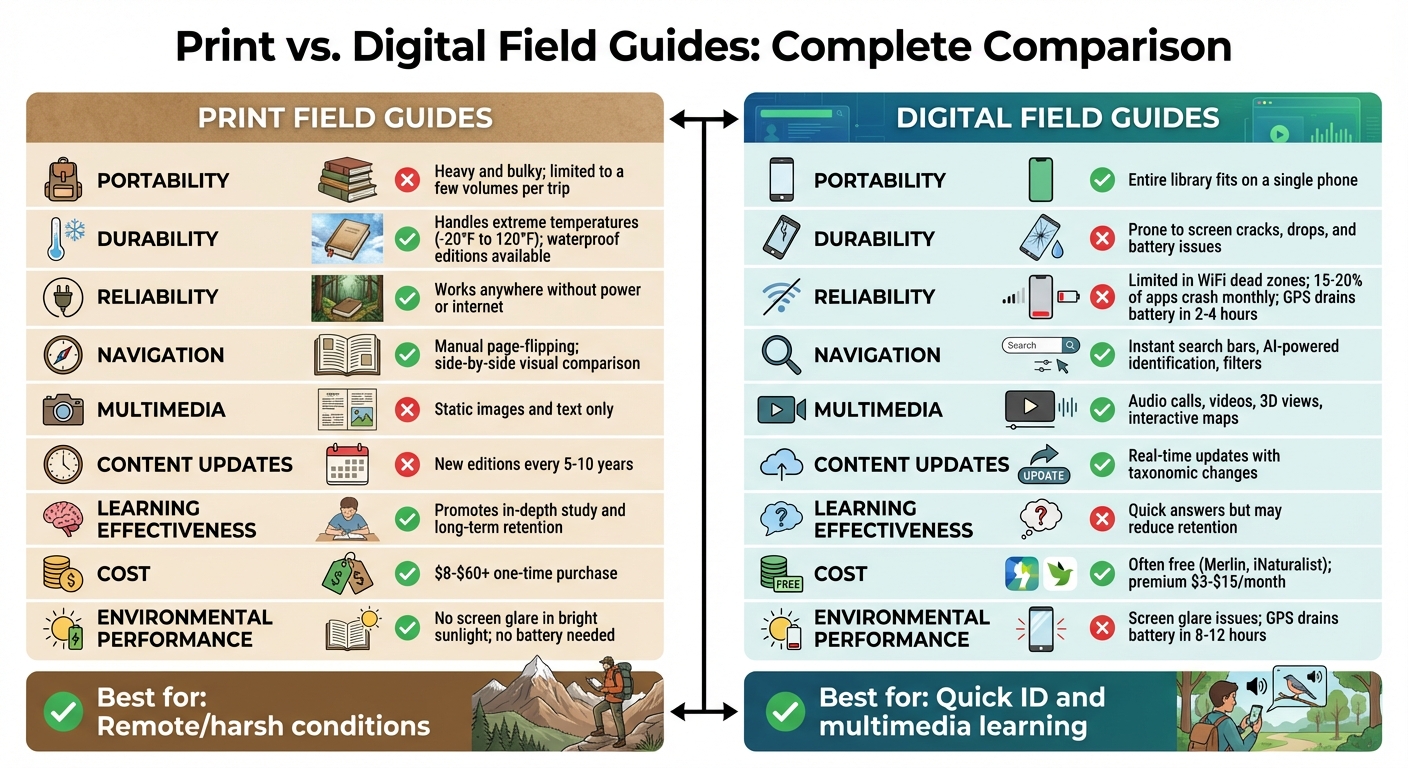
Print vs Digital Field Guides Comparison Chart
Portability and Durability
When comparing print and digital field guides, their portability and ability to withstand outdoor conditions highlight their respective strengths and weaknesses.
Size and Weight
Traditional print field guides can be cumbersome for outdoor excursions. As tallastro, a member of the iNaturalist Forum, aptly put it:
"Few people would carry that much weight [of a full flora] into the woods… the digital ones have a few real advantages".
To address this, publishers now offer smaller editions (ranging from 3.5" x 5" to 5.5" x 8.5") designed to fit into backpacks or jacket pockets. For instance, the National Geographic Field Guide to the Birds of North America is over a pound lighter than the Sibley Guide, making it a better option for hikers. On the other hand, a smartphone can store thousands of guides without adding any physical weight. This difference in portability can significantly impact usability during outdoor activities.
Performance in Outdoor Conditions
Weather resistance is a crucial factor when choosing between print and digital guides. Standard paper guides are vulnerable to water damage, but modern outdoor editions are made with synthetic paper and UV coatings, making them waterproof. These guides are designed to endure extreme temperatures, from -20°F to 120°F, and often feature spiral coil bindings that allow for easy, one-handed use.
Digital devices, however, struggle in challenging outdoor environments. Rain can render touchscreens unresponsive, extreme temperatures drain batteries, and devices are prone to screen damage. GPS-enabled apps are particularly taxing, with mapping apps crashing 15–20% of the time and GPS usage depleting batteries within 2–4 hours. As jasonhernandez74 on iNaturalist explains:
"Paper field guides will never be obsolete as long as there are still WiFi dead zones or places where your mobile device battery runs out".
Portability and Durability Comparison
Here’s a quick breakdown of how print and digital field guides stack up in terms of portability and durability:
| Factor | Print Field Guides | Digital Field Guides |
|---|---|---|
| Weight | Heavy; multiple volumes add bulk | Lightweight; stores thousands of guides |
| Battery Needs | None; always functional | Battery-dependent; 2–4 hours with GPS |
| Weather Resistance | Waterproof editions handle rain, snow, and temperatures from -20°F to 120°F | Low resistance; screens and batteries fail in harsh conditions |
| Device Reliability | Fully reliable in remote areas; no signal needed | Prone to crashes, signal loss, and hardware issues |
sbb-itb-31b92c7
Usability and Navigation
The way you interact with a field guide plays a big role in your wildlife observation experience. Print and digital guides each bring their own methods to the table when it comes to identifying species.
Navigation Methods
Print guides are all about physical interaction and visual organization. They often use features like color-coded tabs, alphabetical indexes, or taxonomic groupings to help you find what you’re looking for. Many even include silhouettes or "generic shapes" at the front to guide you toward the right bird family before diving into more specific details. This layout makes it easy to compare related species side by side, which can be incredibly helpful.
On the other hand, digital guides rely on technology to streamline the process. Search bars and filters let you narrow down your options based on characteristics like color, size, behavior, or location. Apps like Merlin Bird ID take this a step further with AI-powered tools that can identify species using photos or sound recordings. As Brad Bumgardner, Executive Director of Indiana Audubon, notes:
"The Cornell Lab of Ornithology’s Merlin ID app is a marvel. It puts field marks, range maps, audio, photos, and yes – even AI-powered ID – in your pocket".
These digital tools are especially handy for beginners, offering quick prompts to help solve the mystery of an unknown bird. However, some users find digital guides less intuitive, as they often require multiple clicks to access information that a print guide presents on a single page.
Digital guides also stand out by offering multimedia features that go beyond traditional browsing.
Multimedia and Interactive Tools
While print guides stick to static images and text, digital platforms add a dynamic layer to species identification. They include audio recordings of bird calls and songs, which can be a game-changer when you hear a bird but can’t spot it. For example, Merlin’s Sound ID feature can identify species in real time, even during the chaotic symphony of a dawn chorus.
Beyond sound, digital platforms offer videos, 3D perspectives (like viewing a warbler from below), and a library of photos that show birds in different settings. Apps like iBird Pro use interactive overlays and multi-attribute filters to help you quickly narrow down species while highlighting key field marks directly on illustrations. Others, such as BirdsEye and Audubon, leverage GPS to show nearby sightings and hotspots, helping you locate specific species in your area. Digital tools also stay up to date with the latest taxonomic changes and rare sightings, keeping your field decisions current.
However, some argue that the hands-on approach of print guides fosters better learning. As forum contributor jhbratton (iNaturalist) explains:
"I think you learn more by identifying things yourself. The book shows you the other similar species and what the critical differences are".
Print guides encourage a more deliberate approach, helping users study bird families and their unique traits.
Usability Comparison
| Feature | Print Field Guides | Digital Field Guides |
|---|---|---|
| Navigation | Manual flipping, visual indexes, side-by-side plates | Search bars, filters (color, size, location), hyperlinks |
| Multimedia | Static illustrations and photos only | Audio calls, videos, 3D views, unlimited photos |
| Identification Tools | Visual comparison (e.g., Peterson System arrows) | AI-powered Photo and Sound ID |
| Updates | Fixed until next edition (5–10 years) | Instant/automatic updates |
| Readability | Fixed font and image size | Zoomable images, adjustable text |
| Learning Style | Encourages mindful study and comparison | Provides rapid, often automated, identification |
These features shape how effectively and efficiently users can identify species in the field, making them a central focus of this guide.
Content and Updates
The way content is managed in field guides plays a big role in their usability, especially when it comes to staying current with species information.
Fixed vs. Updated Content
Print field guides provide a static snapshot of information, updated only when a new edition is released – usually every 5 to 10 years. This means they can lag behind when it comes to changes like new taxonomic classifications or species range expansions.
In contrast, digital guides are continuously updated, offering real-time information. They can include rare species, multimedia elements, and detailed photo galleries that print guides simply can’t match due to space and cost limitations. For example, as iNaturalist forum member spiphany pointed out:
"His Flickr pages include, in many cases, a dozen or so photos of each species… This richness of photos far exceeds anything that could realistically be included in a printed volume."
Digital guides also cover niche taxa – like springtails or specific bee species – that wouldn’t be practical for print editions. However, this comes with some downsides. Digital content often relies on user contributions, which may not go through the rigorous fact-checking process typical of print guides. There’s also the risk of "link rot", where online resources may vanish if their creators lose interest or funding, as noted by iNaturalist user sedgequeen:
"On-line resources can be ephemeral. If whoever hosts the information loses interest or funding, the whole thing can be lost."
These differences in how content is updated also affect how users can personalize their guides.
Personalization Options
Digital field guides offer plenty of ways to tailor your experience. You can create bookmarks, searchable notes, and even life lists. Many apps also include features like quizzes and filters to help you identify species based on location, color, or behavior.
Print guides, while less customizable in a digital sense, have their own charm. They allow for physical interaction – you can jot down notes, sketch observations, or pencil in updates directly on the pages. This hands-on approach offers a sensory experience that doesn’t depend on technology, and it can make your observations feel more personal and memorable.
The table below outlines the key differences between print and digital field guides:
Content Comparison
| Feature | Print Field Guides | Digital Field Guides |
|---|---|---|
| Content Variety | Limited to common species due to page constraints | Broad coverage, including rare and obscure taxa |
| Update Frequency | Static; updated with new editions every 5–10 years | Updated in real time |
| Multimedia | Text and static images only | Includes audio, videos, and AI tools |
| Customization | Physical notes and bookmarks | Digital notes, filters, and bookmarks |
| Reliability | Highly vetted content; works offline | May include unverified info; requires power |
Choosing between print and digital guides often comes down to what you prioritize – whether it’s the permanence and tactile nature of print or the dynamic, detailed features of digital formats.
Performance in Wildlife Observation
When it comes to wildlife observation, portability and the ability to update information quickly can significantly affect performance. In the field, the ability to identify species swiftly and accurately is crucial. Both print and digital formats offer unique advantages tailored to different conditions and levels of expertise.
Species Identification Speed
Print guides, such as those using Peterson’s arrow system for side-by-side comparisons, excel in delivering quick visual identification. Imagine trying to differentiate between two nearly identical warblers – having both species displayed on the same page can save precious time compared to toggling between multiple tabs on a small screen.
On the other hand, digital guides leverage AI-powered tools for real-time identification, offering updates that reflect new taxonomic information and range changes. This is an area where print guides simply can’t compete. Brad Bumgardner, Executive Director of Indiana Audubon, highlights the capabilities of digital tools:
"The Cornell Lab of Ornithology’s Merlin ID app is a marvel. It puts field marks, range maps, audio, photos, and yes – even AI-powered ID – in your pocket".
Merlin’s Sound ID feature, for instance, can identify multiple bird species simultaneously during a dawn chorus – something print guides can’t replicate. For bird watchers or hunters working in areas where species ranges are shifting, this level of precision is invaluable.
While digital guides excel in speed and up-to-date information, their convenience and advanced functionality determine who benefits most from each format.
Suitability for Different Skill Levels
The effectiveness of field guides also depends on the user’s expertise. Digital tools are particularly helpful for beginners, offering instant answers through AI identification. However, this ease of use may come with a downside. As iNaturalist forum member jhbratton points out:
"I think you learn more by identifying things yourself. The book shows you the other similar species and what the critical differences are. iNaturalist gives you the (or an) answer but I find if I haven’t put in the effort, it doesn’t stick in my mind".
Print guides, by requiring manual identification, encourage deeper study and reinforce important skills. Their idealized illustrations often highlight key diagnostic features that can be obscured in photos due to distracting backgrounds or inconsistent lighting. For those looking to develop a deeper understanding – like dedicated birders or hunters – this learning process is invaluable.
For experienced observers, digital formats offer unmatched convenience, especially for specialized taxa or when access to an extensive reference library is needed. For example, a European spider guide in print might only cover about 400 species due to space limitations, even though the region has over 5,500 species. Digital resources can provide dozens of photos for each species, showcasing variations that print guides simply can’t accommodate. However, experienced users still find print guides reliable in remote areas where WiFi is unavailable, batteries run out, or cellular signals fail.
Complete Comparison
Print vs. Digital Field Guides Summary
The table below outlines the primary differences between print and digital field guides, focusing on aspects like portability, durability, navigation, content, and overall field performance.
| Feature | Print Field Guides | Digital Field Guides / Apps |
|---|---|---|
| Portability | Heavy and bulky; usually limited to a few volumes per trip | Extremely compact – an entire library fits on a single phone |
| Durability | Can be damaged by water and mud unless printed on synthetic paper or UV-coated | Prone to screen cracks, drops, and battery issues |
| Reliability | Works anywhere without power or internet; handles extreme temperatures (–20°F to 120°F) well | Limited in areas with no WiFi or when the battery dies; 15–20% of apps experience monthly crashes |
| Navigation | Relies on manual page-flipping and side-by-side plates using the Peterson System | Features instant search bars, AI-powered identification, and Sound ID |
| Multimedia | Offers only static images and text | Includes audio, videos, and interactive maps |
| Content Depth | Limited by page count, yet ideal for side-by-side species comparisons | Virtually unlimited photos, videos, and dynamic content |
| Update Speed | New editions are released every 5–10 years | Updates occur almost instantly with taxonomic changes and new data |
| Usability | Offers a tactile experience with no screen glare or distractions from notifications | Can cause screen fatigue and requires switching between tabs |
| Learning Effectiveness | Promotes in-depth study of systematics and identifying features | Provides quick answers but may not encourage long-term retention |
| Cost | Typically costs $8 to $60+ per book as a one-time purchase | Often free (e.g., Merlin, iNaturalist), with premium features costing $3–$15 per month |
| Environmental Performance | No screen glare in bright sunlight | Suffers from glare, and GPS usage can drain the battery within 8–12 hours |
Digital tools, like Merlin’s Sound ID, bring features to the table that print guides simply can’t replicate. For example, they can instantly identify multiple bird species during a dawn chorus. However, print guides remain a dependable choice in remote areas or harsh conditions. This comparison highlights how each format caters to different needs, whether it’s the tactile reliability of print or the dynamic features of digital.
Conclusion
Deciding between print and digital field guides comes down to choosing the tool that best suits your needs. Print guides shine in remote areas where batteries can fail, and cellular signals are nonexistent. On the other hand, digital apps like Merlin ID offer features that printed books simply can’t match, such as instant updates and interactive capabilities. As Brad Bumgardner, Executive Director of Indiana Audubon, puts it:
"The field guide, in its printed form, is entering its twilight. That’s not a loss. It’s a transformation."
Many naturalists now combine both options, using digital apps for quick identification and sound recognition while relying on printed guides for in-depth study and reference. This blend allows you to enjoy the best of both worlds – digital tools for their convenience and multimedia features, and print guides for their reliability and immersive learning experience.
For outdoor enthusiasts, the choice often depends on the situation. A waterproof printed guide is a dependable companion for multi-day backcountry trips, while a digital app excels during birding outings with its real-time sound identification. Pairing either format with high-quality optics from Scope It Outdoors (https://scopeitoutdoors.com) ensures you’re well-equipped to observe and confirm wildlife sightings, whether you’re using binoculars or scopes.
FAQs
When should I bring a print guide instead of an app?
A print guide comes in handy when you want to steer clear of relying on Wi-Fi, batteries, or electronic devices – especially in those remote spots where connectivity is unreliable. It’s always available, even without power, and lets you jot down personal notes directly on the pages. Plus, holding a physical guide offers a tactile, distraction-free way to access information quickly and dependably, which can be a lifesaver if your device fails or you run into connection problems.
Can digital field guides work offline without cell service?
Yes, plenty of digital field guides work offline by saving data directly to your device. This means you can still access all the information you need, even in places without cell service. Just make sure to download the required content ahead of time so you’re prepared for your outdoor adventures.
How do I keep my phone running for ID apps on long trips?
To make sure your phone stays powered for identification apps during long trips, take advantage of battery management tools. Most smartphones let you check which apps are draining your battery and close them through the settings menu. You can also use apps designed to optimize your phone’s settings or enable smart profiles that adjust power usage automatically. These simple actions can help keep your device running smoothly for the duration of your journey.